- the blog comes from Github written by Principal Software Engineer Derrick Stolee.
- jfyi – git was originally created by your favourite linux guy, Linus Torvalds for him to help manage version control himself for the Linux Kernel
- lots of technical things here, the blog summarizing a lot of things. I am sure the technical implementations are much more complicated and deserves closer examination.
- git is almost like a local database, but a super specialised one.
- git objects are the data itself. It is stored to the disk
- git cli are the queries
- it uses a lot of smart ways to reduce data storage requirements and fast lookups
- hence when we’re writing code and making changes on the current file, the previous file changes reference are stored locally.

Object Store
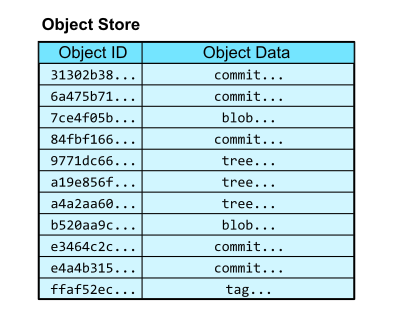
- stores the content of the data itself. You can think of it as having two columns, a hash object id and the object the data.
- there are several types of object data
- the commit reference
- the tag reference
- the tree reference
- the blob (raw data)
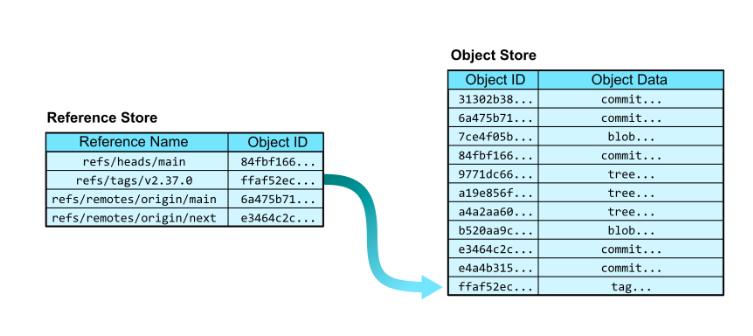
- We do not handle the object store directly. We use human readable “references”, which is something like another table that has two columns. The humand readable reference name and the object id lookup that refers to the object store.
- for the object itself, it does not always store the blob because it can reuse some data from the relevant commits. It contains links to parent commits, root tree, meta data, commit time and commit message.
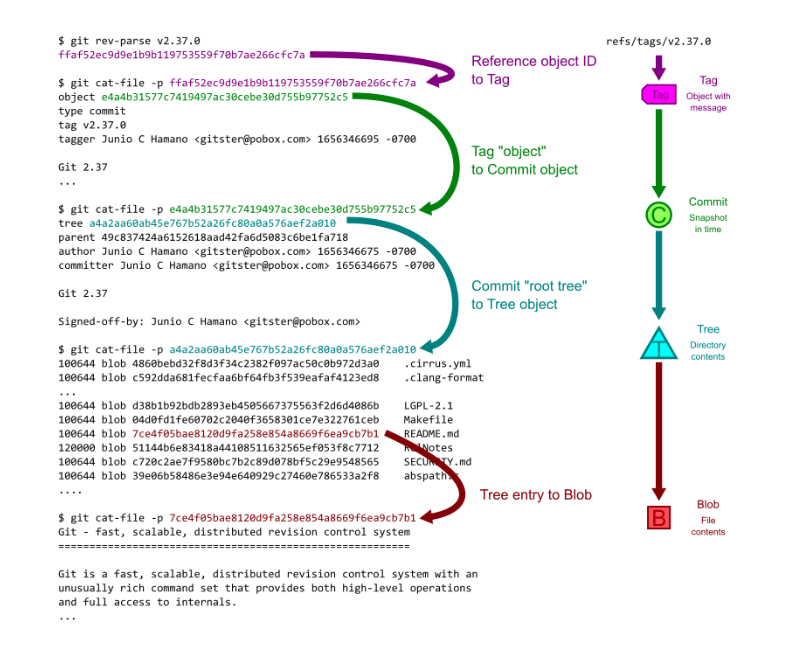
- This seems like a lot of lookups are required to get a full commit history. I can of think of it like a graph database association. For a given object id, we want to see all the relationships such as the root, references, associated commits. The algorithms implemented uses these ideas.
- the internals of the git CLI allows creating the object id and content directly. I don’t know what is the use case to do this manually, but good that it is exposed in the cli.
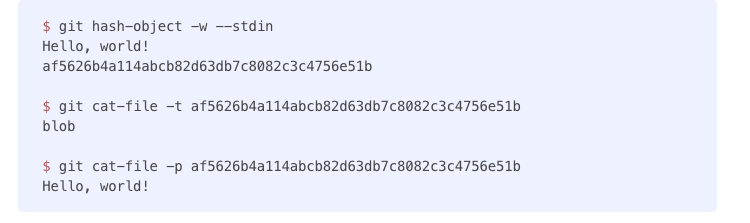
- below shows the process of creating git objects

- now we know git objects stores the content of the changes itself or references related to it, one other thing is the git cli does not always operate on thousands of git objects. That would be too expensive to maintain and slow things down.
- got handling many git objects, there is something called packfiles and its associated idx.
- the packfiles can be thought of the compressed form of git objects, that again stores reusable data.
- the idx is a lookup file that references to the packfile. It contains a list of object ids sorted in lexicographical order so a “binary search” is sufficient to check if a given object id is within the packfile.
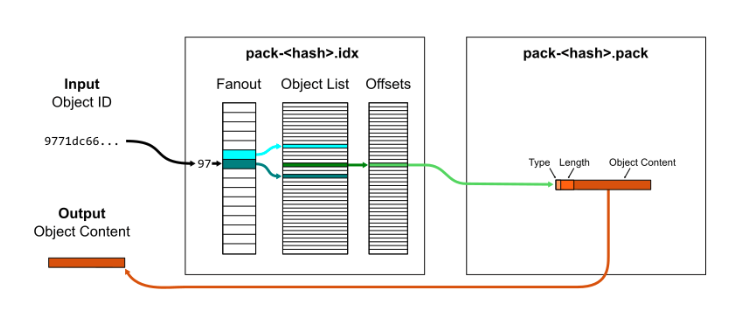
- the idx also can be aggregated into a single multi-pack-index which would have references to the location of different pack files and which object id is in each one of them.

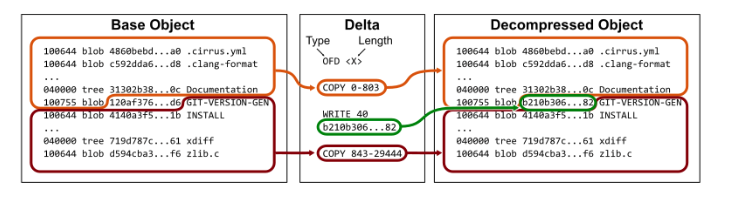
- git has ability to compare changes at a row level. At the same time, compression is also needed via packfiles. Hence the packfile has a row compression feature called “deltification”. The deltification compares plain text files.
- there are a lot of many different algorithms available to compare differences between two blobs, each can have very big different results.
- based on the algorithm, a format will be decided for the packfile.
- for performance reasons, we don’t want to have a huge packfile that contains many objects that ends up with large delta chains. This is configurable specified by “pack.depth config value”
- there additional optimisations needed to handling pack files since it deals to decompressing, writing, compressing again, and saving to disk in order to update some files. This is very low level optimisation for repacking. One technique is called “geometric repacking option” which basically organizes packfile in a way where the smallest files gets read/changed first, and as you need to work on the next set of packfiles, the files becomes larger. The detail here is to work on small files most of the time, and when needed, work on the bigger file later in some outlier cases.
Differences between Git and Relational DBs
- git process are short lived vs DB processes are long lived
- git makes all the changes directly on the disk, while DB can do optimisations on using the memory to persist the data, something like B-Tree which DBs loads to memory to deal with fast lookups.
- each git queries spawns up one process. Most DBs uses shared threads
- git starts a new process for every query. When something like a packfile is being changed, git need to stop all other processes from modifying/reading the data before making changes. DB has concurrency.
- My opinion, I like git the way it is. It should not have long running processes. If I shut down the computer abruptly, I don’t want to worry about the git objects corrupted.
Ref:

 Coffee Break
Leave a comment